A Study, End to End
This is what actually happens between typing a question and reading a report.
The stages are the same sv-* workflow the open-source package runs; here you
drive them by talking.
The shape of it
flowchart TD
    Q["your question"] --> INIT["sv-init<br/>route · scope · ground"]
    INIT --> MODEL["sv-build-model<br/>(from-scratch studies only)"]
    MODEL --> ENV["sv-build-environment<br/>E — layers, events, broadcasts"]
    ENV --> POP["sv-build-population<br/>P — personas, materialized"]
    POP --> RUN["sv-run<br/>the simulation"]
    RUN --> REP["sv-report<br/>conclusions bound to numbers"]
    REP -.->|"change something"| ITER["sv-iterate<br/>version or branch"]
    ITER -.-> ENV
Each stage writes one artifact and shows up as a card in the observation pane. You can stop and look at any of them before going on.
1. Say what you want to know
One or two sentences. The assistant will come back with its reading of the question — who the population is, what changes over time, what a step means, and which metrics would answer it — and ask you to confirm or correct it before building anything.
It also decides how to build:
| route | when | what you get |
|---|---|---|
| reuse | an existing study already covers the question | a fork of it, with your parameters changed |
| from scratch | nothing matches | a new model written for your question — the usual case |
| wrap | you bring an existing simulator | your engine behind the standard interfaces |
A real-world search always runs at this stage. Numbers that matter get a source; numbers that can't be sourced are written down as declared assumptions rather than quietly invented. Both end up in the report.
2. Answer the confirmation cards
At each decision point the assistant asks with a question card in the conversation: a question, a few options with explanations, and an "other" box for your own answer.
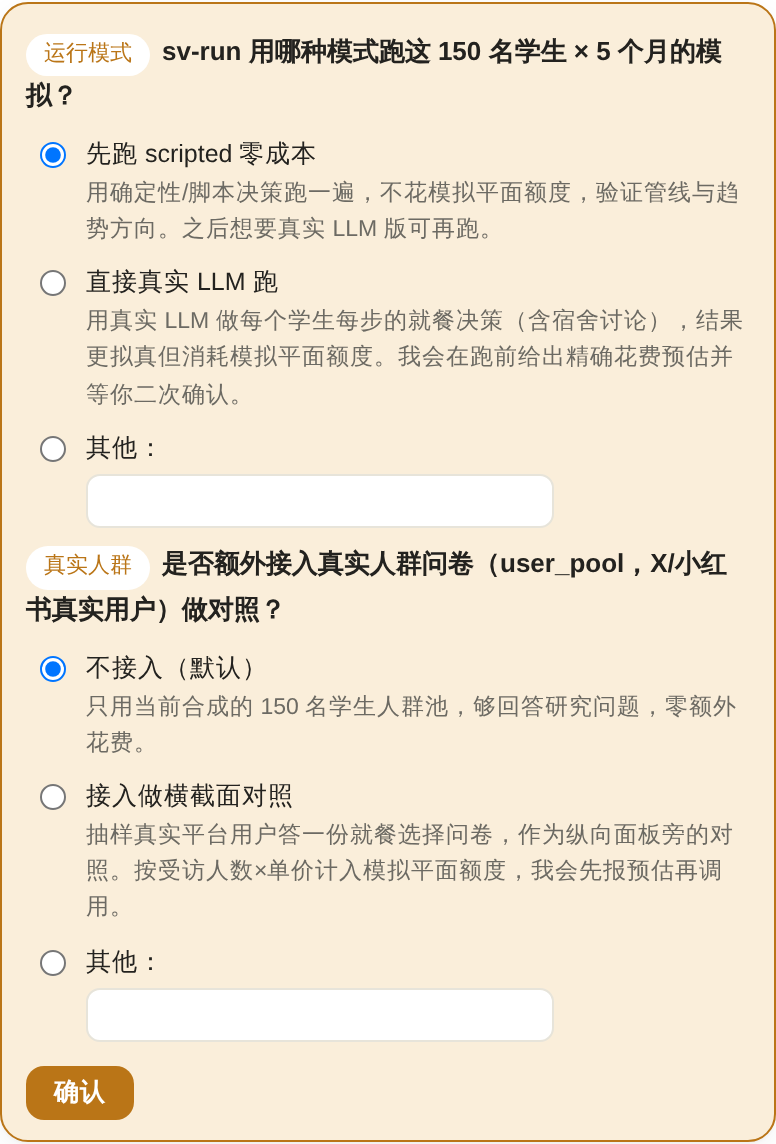
These are not decoration. The flow waits for your answer — the assistant cannot proceed past a question card. Answered cards grey out and keep your choice visible, so the record of why the study looks the way it does stays in the transcript.
You will always get one before a real, cost-bearing simulation run.
3. Watch the artifacts land
As each stage finishes, a stage chip appears in the conversation; clicking it scrolls the observation pane to that stage's card. You can read the environment layers, the population composition, and the run configuration as they're produced — and say "make the population older" or "move the intervention to step 4" before anything is spent on a run.
4. The run
Before running, the assistant states the configuration and the expected cost and asks for confirmation. The run then executes in the foreground — you watch the step bar advance and the metric chart grow in real time.
Runs are kept short here
Hosted runs are sized to finish within about ten minutes. If your question needs a much bigger population or a much longer horizon, the assistant will say so before running, and you can either cut the scale or take the study to a local clone — the study directory runs unchanged. See Limits & Fair Use.
You can close the tab. The run continues on the server, and reopening the study replays the conversation and shows where it got to. Nothing is lost by navigating away.
To abort a turn in progress, press Stop — the Send button becomes a Stop button whenever the assistant is working.
5. The report
sv-report writes a report that leads with its conclusions and then earns them:
a headline summary, the trajectory tables and figures, findings where each claim
is paired with the specific number it reads off, deeper cross-metric insight,
and finally the data basis table — every load-bearing number with its source
or its declared assumption.
Ask follow-up questions in the same conversation. The results stay queryable, so "which agents changed the most between step 2 and step 3?" is a fair question after the fact.
6. Change something and run again
Say what you want different — a stronger intervention, a longer horizon, a different population mix. Every change to a study that already ran goes through the same gate, and the assistant always asks instead of assuming. There are three exits:
| exit | when it applies | what it costs |
|---|---|---|
| new version (the default) | any change to the population, the behaviour function or the decision mode, the seed, the run settings, or an intervention that fires before the fork step | a cold run from step 0 — the whole horizon is simulated again |
| branch (counterfactual) | the edit only adds interventions (a scheduled event or a broadcast) at or after a fork step t*, or only stretches the horizon |
steps 0..t*-1 are replayed from the parent's stored actions with no model calls, so only the new steps t*..T are billed |
| modify in place | a throwaway fix you accept losing | nothing is kept: the current results are overwritten on the next run and cannot be recovered |
A branch is what you want when the question is "what if this policy had landed at step 5?" — it keeps the same people and the same history up to step 5 and changes only what happens after, so the branch and its parent read as treatment and control on the same individuals. Not every study can do it: replay needs a study built on the core loop with a single interaction round per step, so a study that wraps an existing simulator, or one that runs several rounds inside a step, is offered a version instead and the assistant says why.
Switching a study between a scripted and a real-LLM run is always a new version: that switch changes the behaviour function, and the earlier run is your comparison baseline — overwriting it would destroy the very thing you're trying to measure. See Iterate: versions and branches.
Things worth knowing about the conversation
- One conversation per study. Each study has its own thread with its own history; opening a study resumes exactly where you left it.
- Language follows your first message. Write in Chinese and the whole conversation, including the report, stays in Chinese.
- The transcript is durable. Refreshing, reconnecting, or coming back a day later replays the history.
- After a service restart, an unanswered question card may be gone. If the conversation looks stalled where a question used to be, just say "continue" — the assistant will ask again.
- Enter sends, Shift+Enter makes a new line. Enter while a Chinese or Japanese IME is mid-composition selects the candidate; it doesn't send.
- Deleting the study deletes its conversation too.