External Capabilities
Anything that isn't code in the repository — an events API, a real-persona pool — is a declared capability, not hidden wiring. Capabilities are indexed in one committed, public file; endpoints and keys live somewhere else entirely; and every study records, by name, which ones it actually used.
The capabilities registry
resources/capabilities.yaml is the public index. It is committed and
open-source on purpose: an entry advertises that a capability exists, when
to reach for it, and how to proceed without it.
| field | meaning |
|---|---|
name |
unique id. For kind: mcp it must equal the server name in .mcp.json |
kind |
mcp | http_client | builtin |
provides |
one line: what it gives a study |
stages |
which sv-* skills consult it (capability_view filters on this) |
use_when |
the trigger condition a skill matches the study against |
confirm |
true = calling it spends the collaborator's budget or sends data out → ask first |
cost |
how the call is metered (see the nuance below) |
available_when |
static check: {mcp_server: <name>} or {env: [VARS…]} |
health |
the live probe to run right before relying on it |
howto |
how a skill applies it, including materialization + provenance rules |
fallback |
what to do when it is unavailable — the offline / open-source path |
attach |
how someone with access registers the private endpoint |
The build skills read this through skills.sv_workspace.capability_view(stage=…),
which returns each entry verbatim plus two resolved fields:
| resolved field | type | meaning |
|---|---|---|
available |
bool |
did available_when pass in this environment? |
availability_note |
str |
why — e.g. which env var or MCP server is missing |
confirm and cost are different signals
confirm: true means the call spends the collaborator's budget or sends
data out, so the workflow stops and asks. cost describes metering.
They are independent. The bundled event_tool has confirm: false and a
cost: it is cheap and read-only, so the workflow just uses it and reports at
the stage gate — but on the hosted service every fetch is still metered
against your quota. Never read confirm: false as "free".
Three invariants hold for every entry:
- Endpoints and keys are never in the registry.
kind: mcpresolves through the gitignored.mcp.json;kind: http_clientthrough env vars in the gitignored.env. - A study pins what it used by NAME in its own
resources.json(McpServerDecl) — reproducible provenance, no private endpoint leaking into a committed artifact. - Adding a service is one registry entry and zero skill edits. Each skill carries one stable, generic capability-check hook; the skill text never mentions a specific service.
Configuring services: .env is the single source
Service keys live in one gitignored file, .env
(start from .env.example). .mcp.json is generated from it:
The renderer reads SV_EVENT_API_URL / SV_EVENT_API_KEY and
SV_USER_POOL_MCP_URL / SV_USER_POOL_MCP_KEY and writes the corresponding
mcpServers entries. Edit .env, re-run the script — never hand-edit
.mcp.json, and never commit either file. See
Installation for the setup path.
event_tool — real-world event & macro context for E
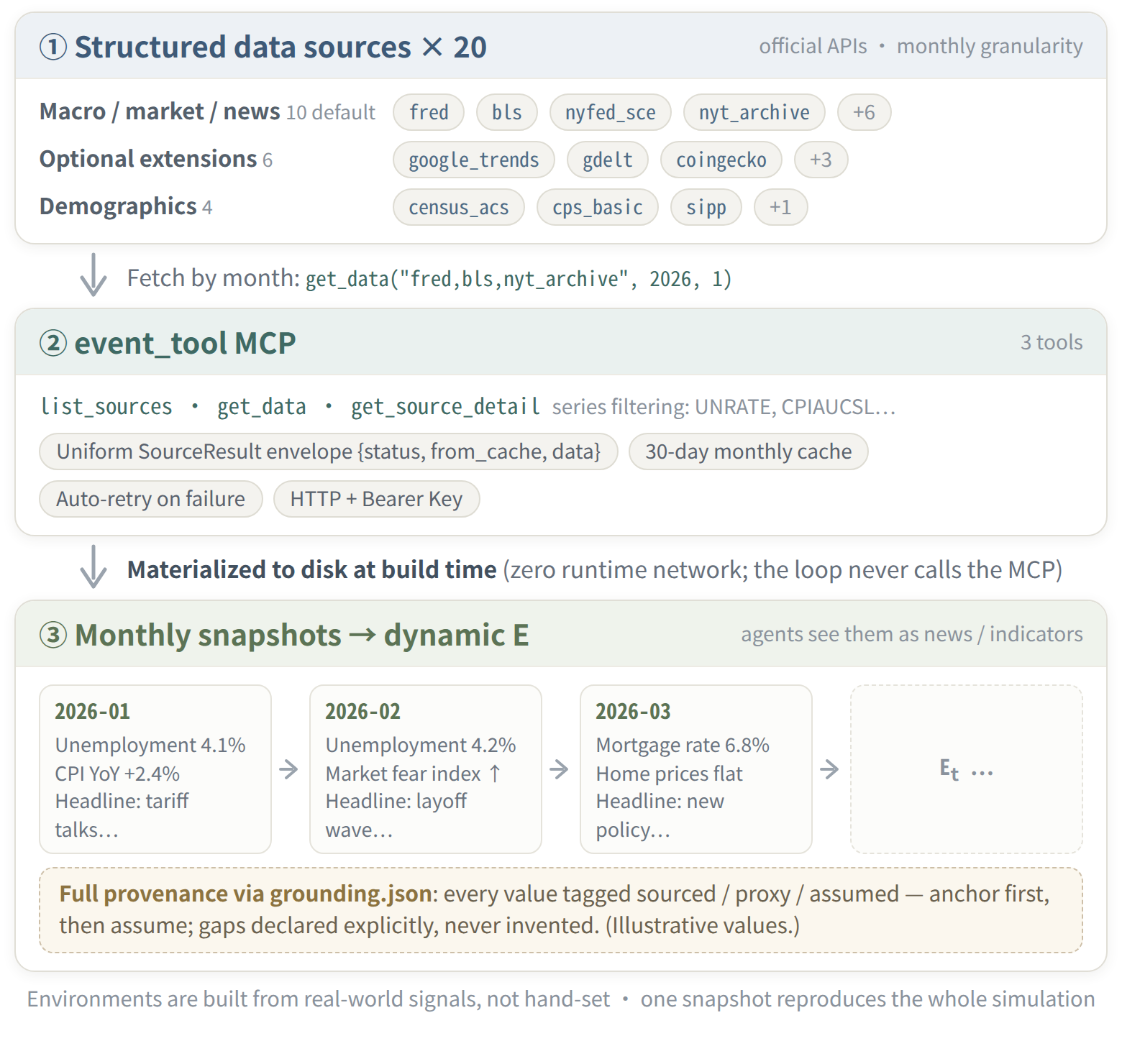
| kind | http_client |
| stages | sv-init, sv-build-environment |
| provides | structured macro / news / market context for E (FRED, census, monthly news archives) |
confirm |
false — but metered; see the nuance above |
| configured by | SV_EVENT_API_URL, SV_EVENT_API_KEY, optional SV_EVENT_LOCAL_CACHE |
sv-init's grounding bootstrap defers structured facts to this service;
sv-build-environment materializes them into the study.
Three things people get wrong
SV_EVENT_API_URLis the full MCP endpoint, path included — e.g.http://host:9997/event_mcp, not a bare host. The production service speaks JSON-RPC over the MCP wire (tools/call get_data) with anAuthorization: Bearerheader. No MCP SDK is required.- The health probe is at the host root,
/healthz, off the MCP path. The client fail-fasts on it before doing any per-source fetching. months=is mandatory. The production service has no query parser — the agent layer was deliberately dropped. Always pass an explicitmonths=list, and usuallysources=too.queryis carried for provenance only.
The API
from socioverse import materialize_external_events, month_range

path, ev = materialize_external_events(
    study_dir,
    query="US inflation and consumer sentiment, 2024",   # provenance only
    months=month_range("2024-01", "2024-12"),            # REQUIRED
    sources=["fred", "nyt"],
)
materialize_external_events(...) writes
environment/external_events.json and returns (path, bundle).
month_range(start, end) builds an inclusive "YYYY-MM" list (capped at 48).
Bundle fields worth knowing:
| field | meaning |
|---|---|
provider |
remote | local_cache | unavailable |
available |
property: provider != "unavailable" |
results |
the payload, keyed "<source>_<YYYY-MM>" |
requested_months / requested_sources |
what you asked for |
errors |
per-tier failure records — read these when a tier degraded |
summary, web_evidence |
legacy. Do not author from these. |
Author broadcasts from ev.results, never from ev.summary
summary (and web_evidence) carry another model's prose. Injecting
that text into E means the behavior you observe is partly a response to a
third-party LLM's framing of the world, not to the world — it contaminates
the attribution of B = f(P, E) and quietly invalidates the study. Read
the typed numbers out of ev.results and write the broadcast yourself.
The fallback chain
The client degrades one tier at a time and never raises:
- remote — the Event service, when
SV_EVENT_API_URLis set and/healthzis ok; - local_cache —
SV_EVENT_LOCAL_CACHE, laid out<source>/<YYYY-MM>.json, for offline work; - unavailable — at which point you are tier 3: plain web search by hand,
hand-authored broadcasts, and every number recorded in the grounding
sidecar with
via="web_search"plus url and accessed date.
A study built without the service is still grounded — the ledger just records the humbler basis. See Grounding & Provenance for how those facts are recorded.
user_pool_survey_mcp — real platform personas for P
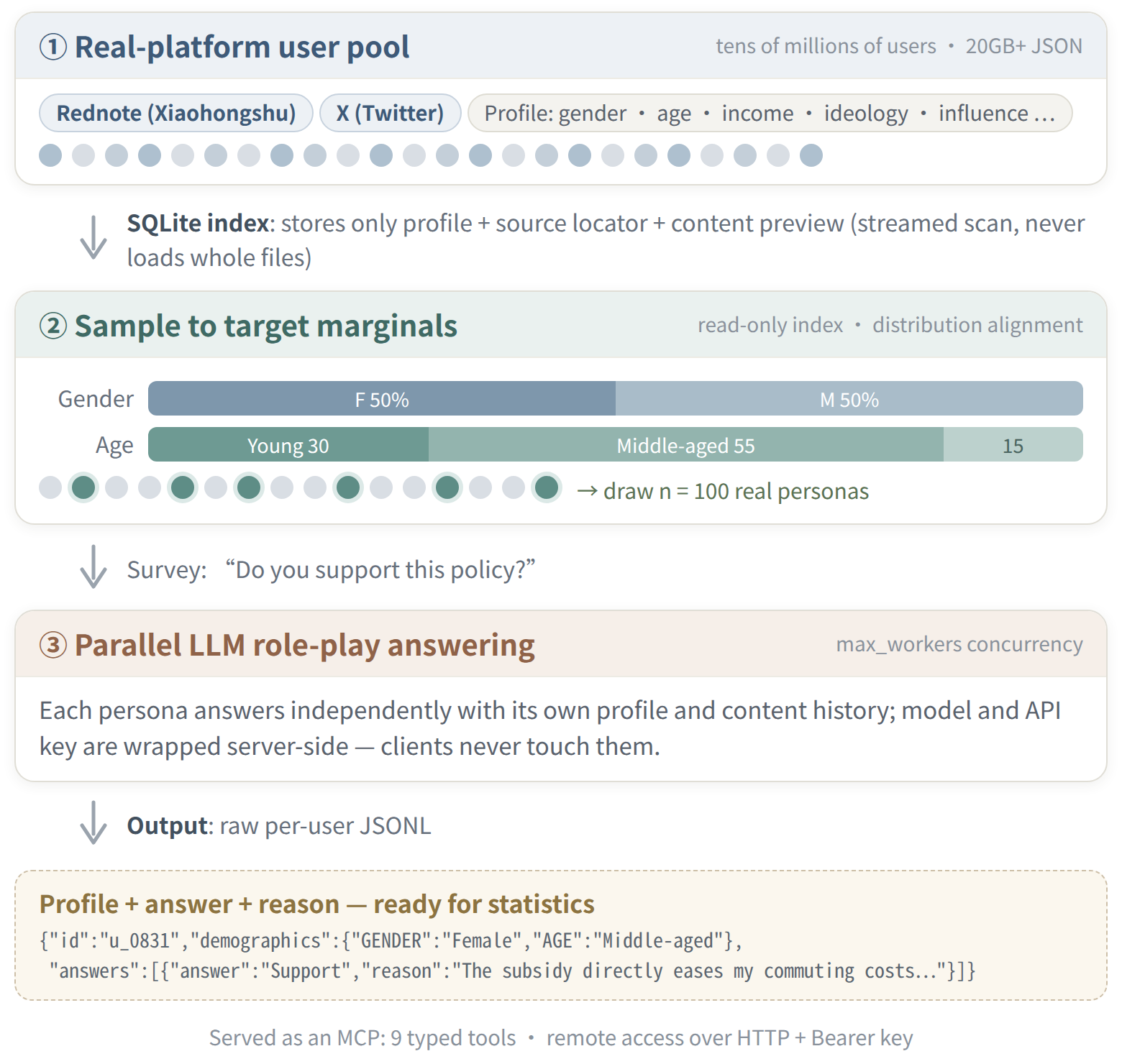
| kind | mcp |
| stages | sv-build-population, sv-report |
| provides | real X/Twitter and 小红书 user personas sampled to target marginals, plus LLM questionnaire answering over them |
confirm |
true — each call spends the collaborator's LLM budget and sends the questionnaire out |
| configured by | SV_USER_POOL_MCP_URL + SV_USER_POOL_MCP_KEY (bearer auth) → .mcp.json |
Use it when P should be grounded in real platform users rather than synthesized ones, or when the study wants a cross-sectional questionnaire baseline next to the longitudinal panel.
Build-time only, through the in-session MCP tools:
- Health-check with
get_user_pool_simulation_capabilities(get_user_pool_index_statusfor the index). - Call
run_user_pool_distribution_simulation(platform_id, distributions, user_count, questionnaire, seed, max_workers)—max_workers≤ 128. Platform ids:x_mode_1(X/Twitter),rednote_v2(小红书).
allow_virtual_users defaults to true
If a target distribution cell has no matching real user, the service
silently substitutes VIRTUAL_* personas to fill it. If you need real
users, pass allow_virtual_users=false and inspect the returned sample
for gaps — a coverage hole is a finding about your population, not
something to paper over.
Materializing the result:
- write the returned
output_jsonlintopopulation/artifacts (personas + roster) with the P-side seamprovider_ref="mcp.socioverse_pool", or into a report baseline table; - record one grounding fact per load-bearing distribution,
via="provider", source = platform + query; - keep the returned
llm_modelin the provenance — the answers are model-dependent.
Cost scales with user_count
A distribution simulation runs one LLM questionnaire answer per simulated
respondent. Cost is roughly user_count × per-respondent rate, and on the
hosted service it is metered against your sim-plane quota — see
Quotas & billing. Because confirm: true,
state the expected spend (the user_count, and that it draws down the
balance) and get an explicit yes before calling.
Fallback: synthesize personas under the grounding-first rules (searched
anchors, or declared assumptions), or load a user-supplied file
(provider_ref="file.personas"), and note in the provenance that the pool was
unavailable.
See also
- Data services: population and event — what the two services do, their tool sets, and what they leave on disk
- Grounding & Provenance — where the facts these services produce are recorded
- External events API reference
- Workflow helpers reference —
capability_view()and friends - Hosted service — where these capabilities are preconfigured and metered