The Workbench
Two screens: a study list and a study view. Everything you do happens in one of them.
The study list
Signing in lands you here. It shows your two balances, a card per study, and one dashed card to start something new.
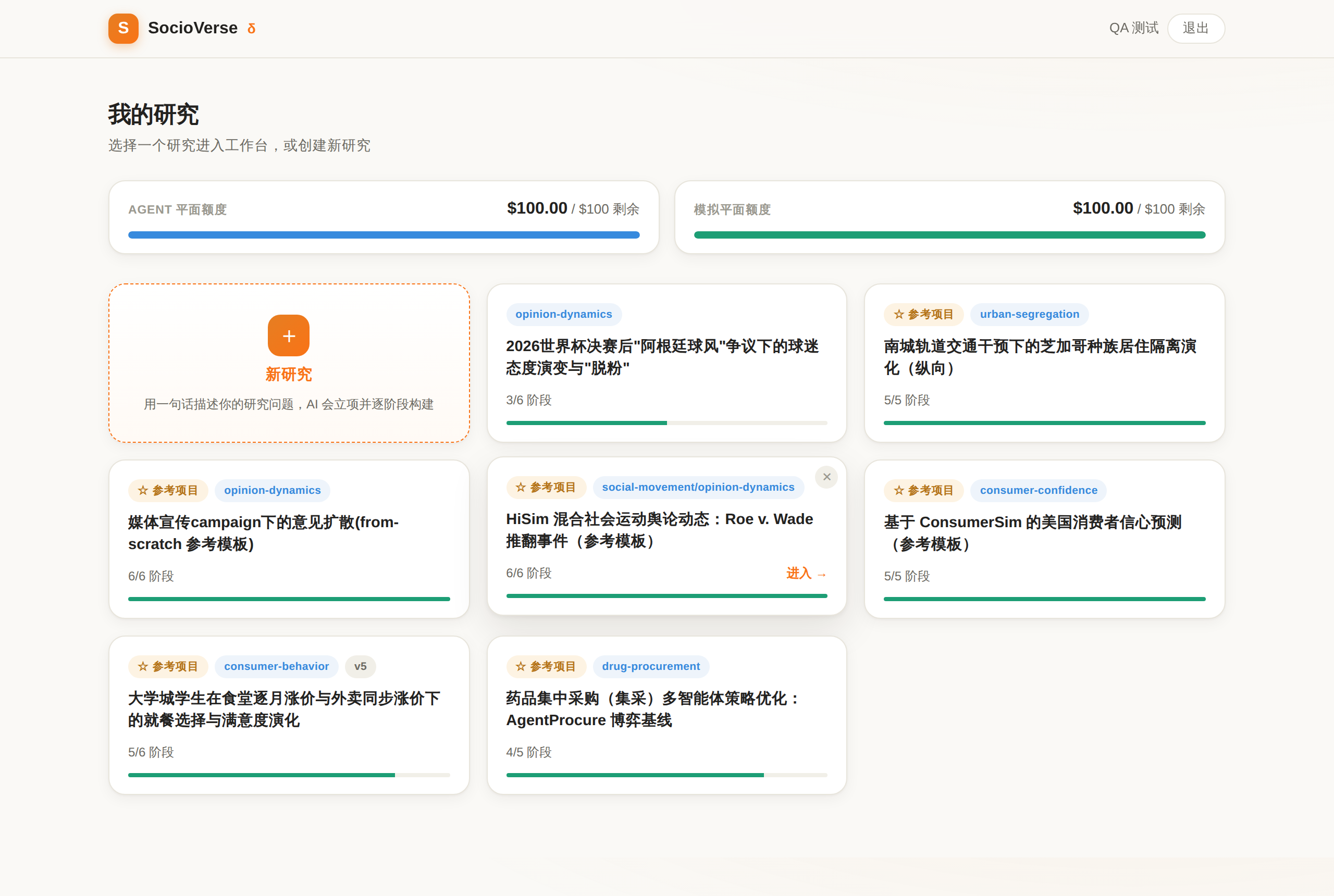
Cards are ordered most recently touched first, so whatever you were last
working on is at the top. Each card shows the study's title (in your interface
language, when the study carries both), its domain, how many pipeline stages are
done, and a ☆ 参考项目 / Reference pill if it is a bundled template.
The interface language follows your browser. Inside a study you can switch it manually, along with light/dark theme.
Reference studies vs your own
Your workspace is seeded with a set of reference studies — worked, grounded, already-run examples that double as templates. They are marked with ☆, and they are read-only baselines: nothing edits them in place.
That is not a permissions quirk, it's the point. A reference study is the comparison baseline for everything derived from it, so asking to change one produces a fork: a new study with a new id, carrying over the artifacts and the grounding ledger, which is then yours to modify freely. The original stays untouched for the next person — and for your own before/after comparison.
The five worked reference studies are documented in Examples.
Removing a study
The card's remove action means two different things, and the confirmation dialog tells you which one you're about to get:
| kind | what happens |
|---|---|
| ☆ reference template | hidden from your list only. The study stays in your workspace, intact |
| your own study | permanently deleted — artifacts, run results, figures, and the study's conversation history. Not recoverable |
Deleting a personal study is final
There is no trash. If a result matters, note the numbers or export the report before removing the study.
The study view
Opening a card gives you the working screen: conversation on the left, observation on the right.
┌──────────────────────────────────────────────────────────────────────┐
│  S   study title            Agent $8.42 · Sim $9.80    ☾  中/EN  ⏻   │
├───────────────────────────┬──────────────────────────────────────────┤
│  conversation             │  pipeline  sv-init ✓ env ✓ pop ✓ run ◔   │
│                           ├──────────────────────────────────────────┤
│  you: …                   │  stage detail card                       │
│  assistant: …             │                                          │
│  ┌─ a question card ───┐  ├──────────────────┬───────────────────────┤
│  │ ○ option A          │  │ metric timeline  │  figures              │
│  │ ○ option B          │  ├──────────────────┴───────────────────────┤
│  └─────────────────────┘  │  agents · events · versions              │
│  [ type here…    ] [Send] │                                          │
└───────────────────────────┴──────────────────────────────────────────┘
- On a wide screen the two panes sit side by side; the page itself never scrolls, each column scrolls on its own.
- Below about 1200 px they become Chat / Observe tabs, opening on Chat.
- The top bar carries your live balances (see Quotas & Billing), theme and language toggles, and links back to the study list.
Each card in the observation pane is explained in Reading the Observation Pane.
You cannot edit artifacts by hand here
In a local clone the study directory is yours to edit in any editor. In the hosted service, changes go through the conversation — you ask, the assistant edits, and the version gate keeps the previous result. This is what keeps the provenance trail intact. If you want direct file access, run the study locally: the directory format is identical.
Starting a new study
The New study card opens an empty conversation with no study bound to it yet. Describe what you want to know, in a sentence or two, and the assistant routes it: reuse an existing study, build a new one from scratch, or wrap something you bring.
The moment it creates the study directory, this conversation becomes that study's conversation — the history you've already built moves with it, and the observation pane starts filling in. You don't have to re-explain anything.
Write the first message like a research question
"How does a 20% canteen price rise change what students eat over a semester?" works far better than "simulate a canteen". Say who, what changes, over how long, and what you'd want to measure — and the routing, the horizon, and the metrics all land closer to what you meant.
Your first message also sets the language for the rest of the conversation.
Next: A Study, End to End.