Quickstart
There are two ways to drive SocioVerse. They produce the same artifacts and the same queryable outputs.
- Agentic (recommended) — open the repo in Claude Code
and let the bundled
sv-*workflow skills take you from a research question to a report, pausing at every stage for your review. - Programmatic — assemble a study directory with the Python API and run it yourself.
First, run the offline demo
If you have just installed, python scripts/demo_offline.py runs a complete
study (the opinion_diffusion template) end to end with no API key, and
python dashboard/server/app.py --open shows it in the local dashboard. See
Installation.
Path 1 — the agentic workflow
Open the repository folder (SocioVerse2/, the root of your clone) as the
project in Claude Code and start a fresh session (skills are discovered at
session start). Then start from your question:
/sv-init "How does a rumor spread through a mid-sized online community
          when an official correction is broadcast on day 3?"
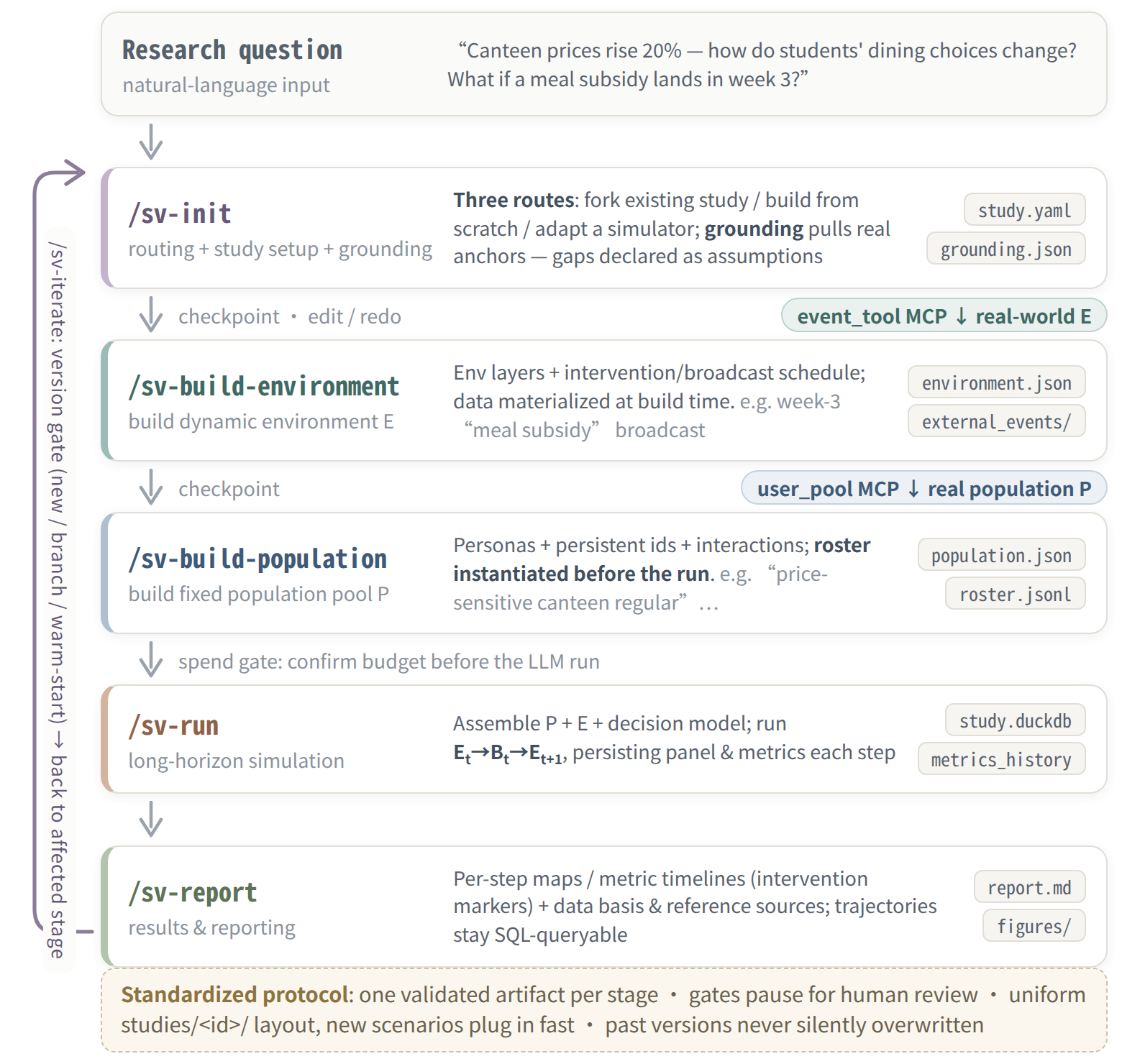
sv-init first routes your query against the catalog of already-built
studies, then scaffolds a new study under studies/<id>/. From there each
skill writes one schema-validated artifact and pauses for you to inspect
or edit it before the next stage:
| stage | skill | writes |
|---|---|---|
| route & scope | /sv-init |
study.yaml + grounding/grounding.json |
| model (from-scratch path only) | /sv-build-model |
model.py |
| environment E | /sv-build-environment |
environment/environment.json |
| population P | /sv-build-population |
population/population.json + population/roster.jsonl |
| run | /sv-run |
trajectory/study.duckdb + metrics_history.json |
| report | /sv-report |
reports/report.md + figures |
| change it later | /sv-iterate |
versions.json + versions/vN/ snapshots |
You control the cadence: "build everything, prompt me before /sv-run" or
"do the whole pipeline" both work — each artifact still surfaces as it
passes.
Two LLM connections
Claude Code runs on its own Claude login (or an ANTHROPIC_API_KEY); the
SV_LLM_* key in .env does not power it and only reaches the simulated
agents. Without an SV_LLM_* key a from-scratch study still runs end to end
in the scripted mode, and /sv-run asks before it spends on real LLM calls.
Driving the same skills from Codex CLI (AGENTS.md + .codex/skills/) is
experimental. See
what powers the workflow skills.
Routing: reuse, build, or wrap
sv-init decides among three paths before any code is written:
- Path A — reuse/adjust: an existing study already covers your
question → it is forked to a new
study_idand only the fork's artifacts are edited. No new code. - Path B — build from scratch: nothing matches →
/sv-build-modelimplements the four core interfaces natively. The default for a new question. - Path C — wrap your own simulator: you bring an existing legacy simulator → see Wrap a Legacy Simulator.
Inspect what got produced
Every stage output is a plain file under studies/<id>/:
S=studies/<your-study-id>
cat $S/study.yaml                    # the StudySpec: question, n_steps, metrics
cat $S/environment/environment.json  # E: layers + scheduled events + broadcasts
cat $S/population/population.json    # P: personas, count, interaction structure
cat $S/population/roster.jsonl       # the instantiated agents' t=0 state
cat $S/reports/report.md             # the rendered trajectory + intervention notes
Path 2 — programmatic
A study directory is data (validated JSON artifacts) plus — for from-scratch
studies — a model.py whose classes self-register on import. Assembling a
run is four validated loads and one call:
import studies.your_study  # noqa: F401 — side effect: @register() runs
                           # (the shipped template is studies/opinion_diffusion)

from socioverse.engine import build_simulator
from socioverse.validation import validate_handoff
from socioverse.schemas import EnvironmentBundle, PopulationBundle, SimulationConfig

S = "studies/your_study"
env_b   = validate_handoff(f"{S}/environment/environment.json", EnvironmentBundle)
pop_b   = validate_handoff(f"{S}/population/population.json",  PopulationBundle)
sim_cfg = validate_handoff(f"{S}/simulation/simulation.json",  SimulationConfig)

sim = build_simulator(
    env_bundle=env_b, pop_bundle=pop_b, sim_config=sim_cfg,
    store_path=f"{S}/trajectory/study.duckdb",
)
history = sim.run()   # E_t → B_t → E_{t+1}; panel + metrics land in DuckDB
build_simulator resolves the *_ref strings in the artifacts against the
registry and returns a
ready LongitudinalSimulator; run() returns the MetricsHistory.
For a no-token dry run (no LLM spend, deterministic), set
"llm_kind": "scripted" in the study's decision_args — see
LLM Clients & Dry Runs.
Library only? pip install socioverse2 is enough for socioverse.*
The PyPI package ships the socioverse library. The studies.* modules
imported above (your own study, or the reference studies) live in the
repository checkout, so run this from a clone or put your own study package
on the Python path.
Read the results
The run lands in a durable DuckDB store you can query directly:
-- one agent over time (the longitudinal view)
SELECT step, state FROM panel WHERE agent_id = '…' ORDER BY step;

-- the aggregate trajectory
SELECT * FROM metrics ORDER BY step;

-- which interventions fired, and when
SELECT step, note FROM events ORDER BY step;
From Python, duckdb.connect(path, read_only=True) gives the same tables.
Where to go next
- Understand the model: Overview — B = f(P, E)
- What's inside a study folder: Anatomy of a Study
- Build your own: Build a Study from Scratch